
Microphone Feedback: Why It Squeals and How to Fix It

Why Does a Microphone Feedback?
Microphone feedback is caused by sounds when they inadvertently pick up audio emitted from the speakers, amplify it, and then capture it again. This process occurs continuously within milliseconds, creating an endless loop of sound capture and amplification. Therefore, when the shrieking sound occurs, it is not a continuous, piercing noise but rather appears in waves, alternating and continuous. Scientifically known as the Larsen effect, this piercing screech or howl arises precisely when the microphone amplifies the system’s overall sound beyond its inherent physical limits—specifically, when the sound picked up by the microphone exceeds the level of the original voice input.
To understand why microphone feedback happens, you need to consider the physical path of the sound waves. When you sing in to a microphone, the internal diaphragm captures your voice and converts it into an electrical signal. This signal is processed, amplified, and output at a higher volume through the karaoke speakers. If the microphone happens to be positioned directly in the path of this sound, it picks up the amplified audio and feeds it back into the system.
Why is a howl typically a distinctive, piercing sound?
The characteristic high-pitched shriek or squeal—often a single, piercing note—is not actually a combination of multiple sounds. Each audio device or wireless microphone amplifies only the specific frequency to which it is most sensitive. When sound within that frequency range is continuously amplified until the sound wave reaches saturation, it produces a sharp, pure, monochromatic tone devoid of background noise. Furthermore, the human ear is extremely sensitive to high-frequency ranges, making the sound particularly unpleasant for the brain to process.
Why Is Microphone Feedback Worse in Small Rooms?
In any ordinary environment, sound waves naturally lose energy and dissipate as they travel through the air or encounter obstacles. However, in a confined space with excessive system volume, sound struggles to dissipate and reflects back into the microphone, causing the sound level to escalate exponentially in a split second.
Walls, Glass and Floors
In typical residential settings like basements or living rooms, the physical principles of acoustics shift dramatically. High-energy sound waves generated by karaoke speakers strike flat, non-porous surfaces—such as sliding glass doors, hardwood floors, and painted walls. Instead of absorbing energy, these surfaces act like acoustic mirrors through specular reflection, bouncing high-frequency vocal signals around the room with minimal energy loss. When these intense reflected waves strike the microphone simultaneously, they trigger rapid phase shifts and comb filtering. The microphone effectively “hears” the room’s chaotic reverberations as a secondary sound source, driving the system straight into ear-piercing feedback.
Speaker and Microphone Distance
Why does placing speakers in the corner of the room often cause microphone feedback?
Placing a high-power Dalton Audio Karaoke Speaker in a corner might save floor space, but it poses acoustic risks and can lead to microphone feedback. When a speaker is positioned tightly against a corner—where two or three walls meet—sound waves strike the walls and reflect chaotically, creating multiple paths for out-of-phase sound.
Low and mid-range frequencies become compressed, resonating by up to 12 dB and bouncing back repeatedly rather than dispersing evenly. Even before any harsh, piercing noise is heard, the bass energy accumulating in the corner creates a muddy rumble or unpleasant microphone feedback, completely destabilizing the audio mix.
How to Stop a Wireless Microphone Feedback
Move the Speaker
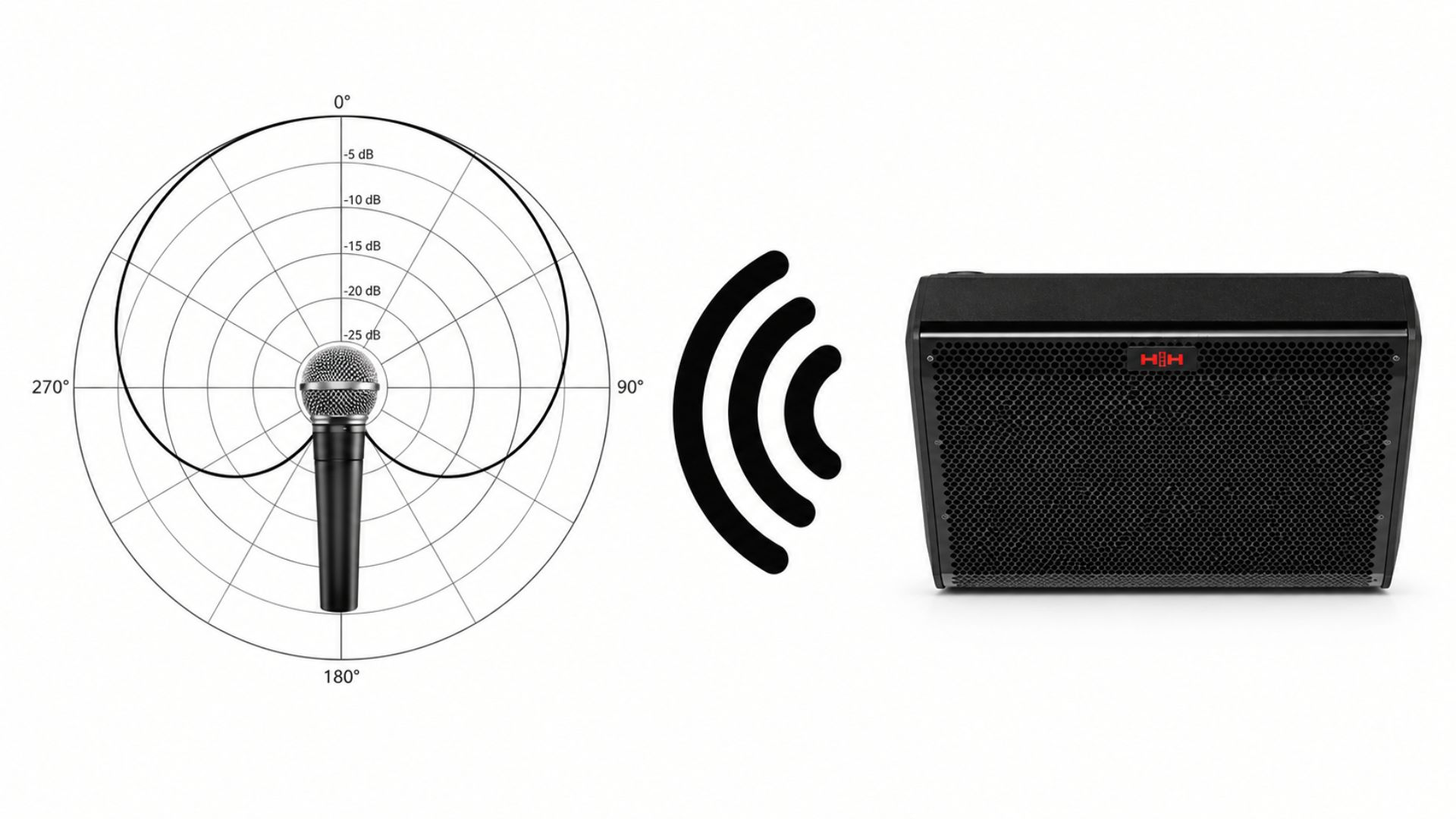
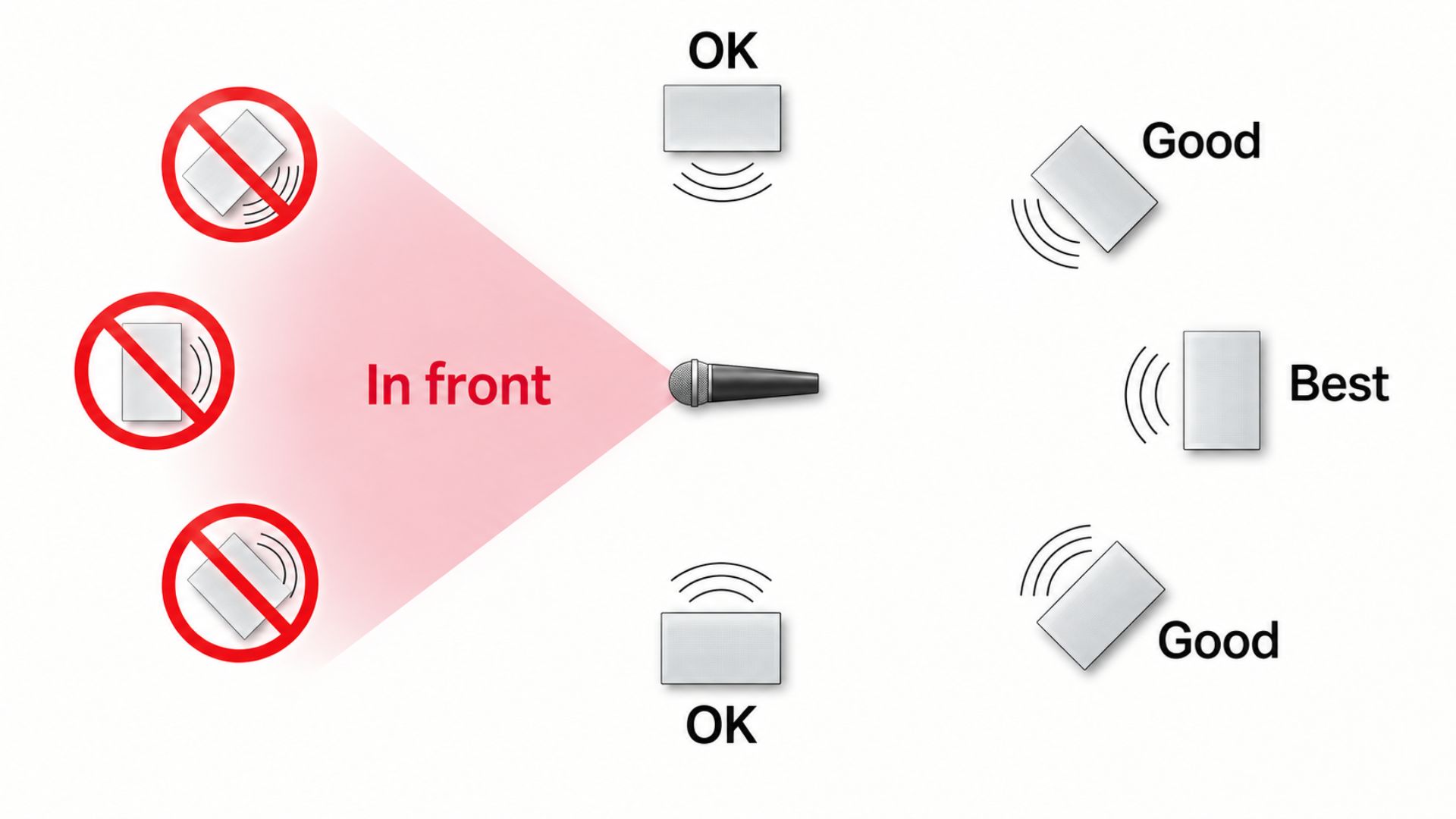
Experts recommend the most crucial solution for preventing microphone feedback: speakers must always be positioned in front of the singer, facing the audience. This is because high-output karaoke speakers emit sound in a conical dispersion pattern. If a speaker is placed behind the performer, high-intensity sound waves travel directly into the microphone’s sensitive front diaphragm, inevitably creating a continuous feedback loop. In audio engineering, this is a fundamental principle of stage layout: sound energy must always be directed away from—never toward—audio pickup devices.
Change Microphone Postition
Most high-quality dynamic wireless microphones feature a cardioid pickup pattern, meaning they are highly sensitive to sound arriving from the front while actively rejecting ambient noise from the rear. This specialized design creates a 131-degree frontal pickup angle and a precise point of maximum sound rejection at 180 degrees—directly behind the diaphragm. To maximize system stability, performers should deliberately aim this rear rejection point toward the main speakers, effectively using the microphone’s “blind spot” to block amplified sound.
Furthermore, singers must strictly avoid cupping or covering the microphone head with their hanFds. Cardioid microphones rely on precisely calibrated rear acoustic ports to cancel out background noise; covering these ports immediately disrupts the diaphragm’s directional phase-cancellation characteristics. This common handling error instantly transforms the microphone into an omnidirectional device, causing it to pick up amplified room noise and trigger immediate, piercing feedback.

Adjust EQ
Adjust EQ microphone feedback rarely happens across the entire audio spectrum; it typically concentrates and rings at specific, problematic frequencies. Utilizing your speaker or mixer’s equalizer is a precise surgical tool to eliminate these resonant spikes. If your system produces a low, muddy hoot or howl,” the room’s bass frequencies are building up. You can stabilize the room by cutting or rolling off the frequencies between 250 and 500 Hz.
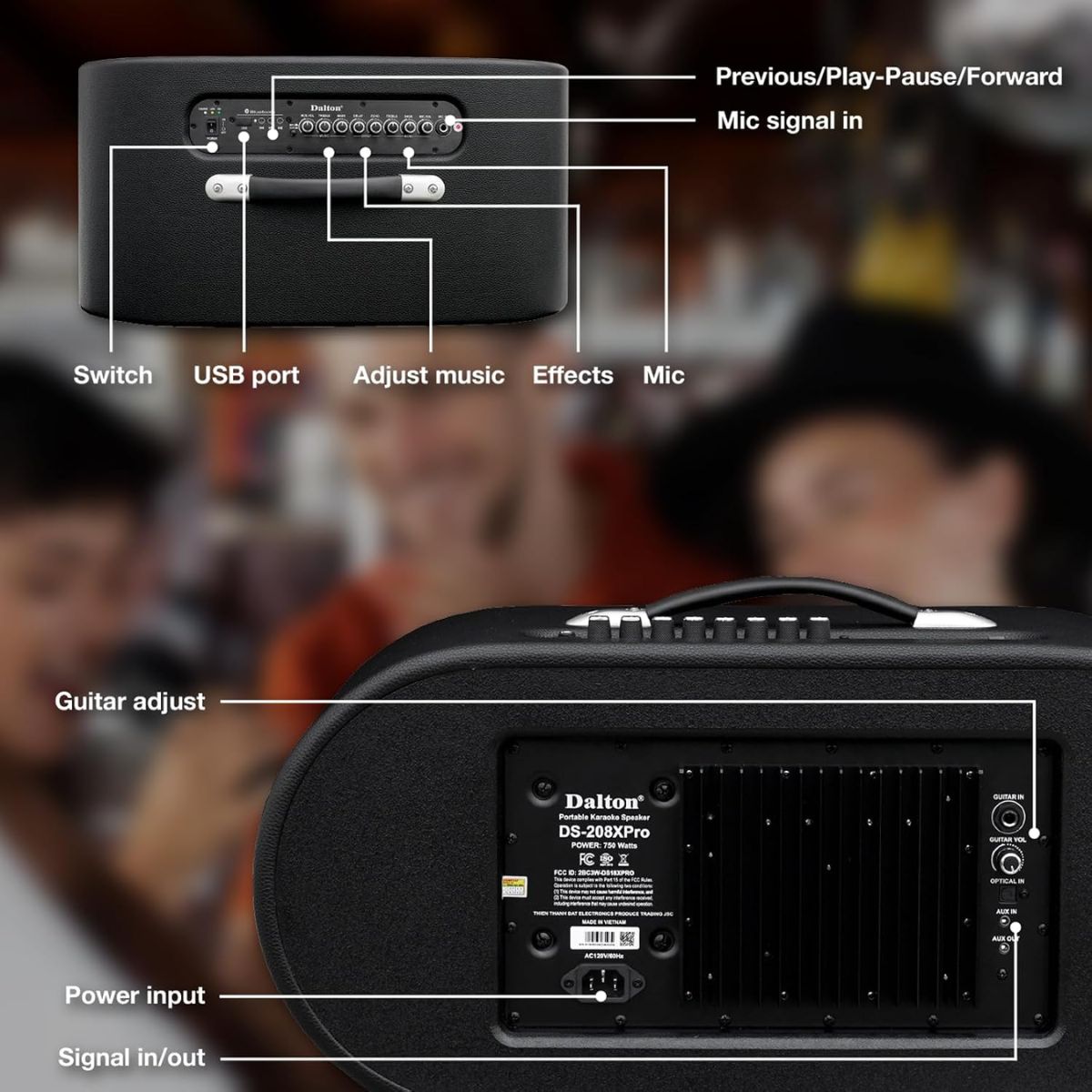
Conversely, if the feedback manifests as a piercing, high-pitched screech or whistle, the tweeter is feeding back into the capsule. Attenuating the high-frequency EQ knobs, generally anything above 2 kHz will usually neutralize the ringing immediately. Unlike complex professional setups that require external mixing consoles, premium all-in-one systems like Dalton Audio speakers feature built-in, tactile EQ controls located directly on the top panel. By referencing the control layout, you can instantly neutralize room feedback mid-performance without interrupting the event.
If your microphone produces a piercing, high-pitched screech, simply locate the dedicated Mic adjustment group on the right side of the panel and slightly turn down the Mic Treble rotary knob. Conversely, if you hear a low, muddy howl building up in the room, roll back the Mic Bass knob. Additionally, you can quickly physically dial back the adjacent knobs in the Effects section to shorten the digital echo, instantly stabilizing your acoustic environment with a simple twist of the wrist.
Does UHF Prevent Microphone Feedback?
UHF transmission does not prevent microphone feedback because UHF technology strictly manages the invisible radio frequency signal traveling between the microphone and the receiver. Microphone feedback, on the other hand, is a physical sound wave problem occurring in the air of the room. Therefore, any microphone will squeal if placed improperly in front of a speaker, regardless of whether it uses a UHF, Bluetooth or a traditional wired connection.
A pervasive misconception in the consumer audio market—often fueled by misleading retail marketing—is that upgrading to a premium Ultra High Frequency wireless system will magically cure room squeal. This stems from a fundamental misunderstanding of how audio hardware operates. It is crucial to draw a strict scientific distinction between electromagnetic radio interference and physical acoustic physics. UHF technology is engineered to solve a completely different set of problems: static, signal dropouts, and connection latency.
Operating strictly within legally mandated FCC Part 15 regulations, specifically the 470-608 MHz spectrum in the United States, a high-quality UHF system ensures a rock-solid, zero-latency digital connection between the singer’s hand and the receiver. It effectively prevents your audio from cutting out when you walk across the room or encounter other wireless devices. However, once that flawless electrical signal is converted back into physical sound waves and projected out of the loudspeaker, it is entirely bound by the laws of room acoustics.
Simply put, UHF guarantees that your voice reaches the speaker with crystal clarity, but it cannot stop the speaker’s sound from bouncing off a living room wall and re-entering the microphone capsule. For a deeper understanding of how radio frequency transmission works, how to avoid static dropouts, and how to optimize your channel frequencies, consult our comprehensive UHF wireless microphone guide.
Q&A
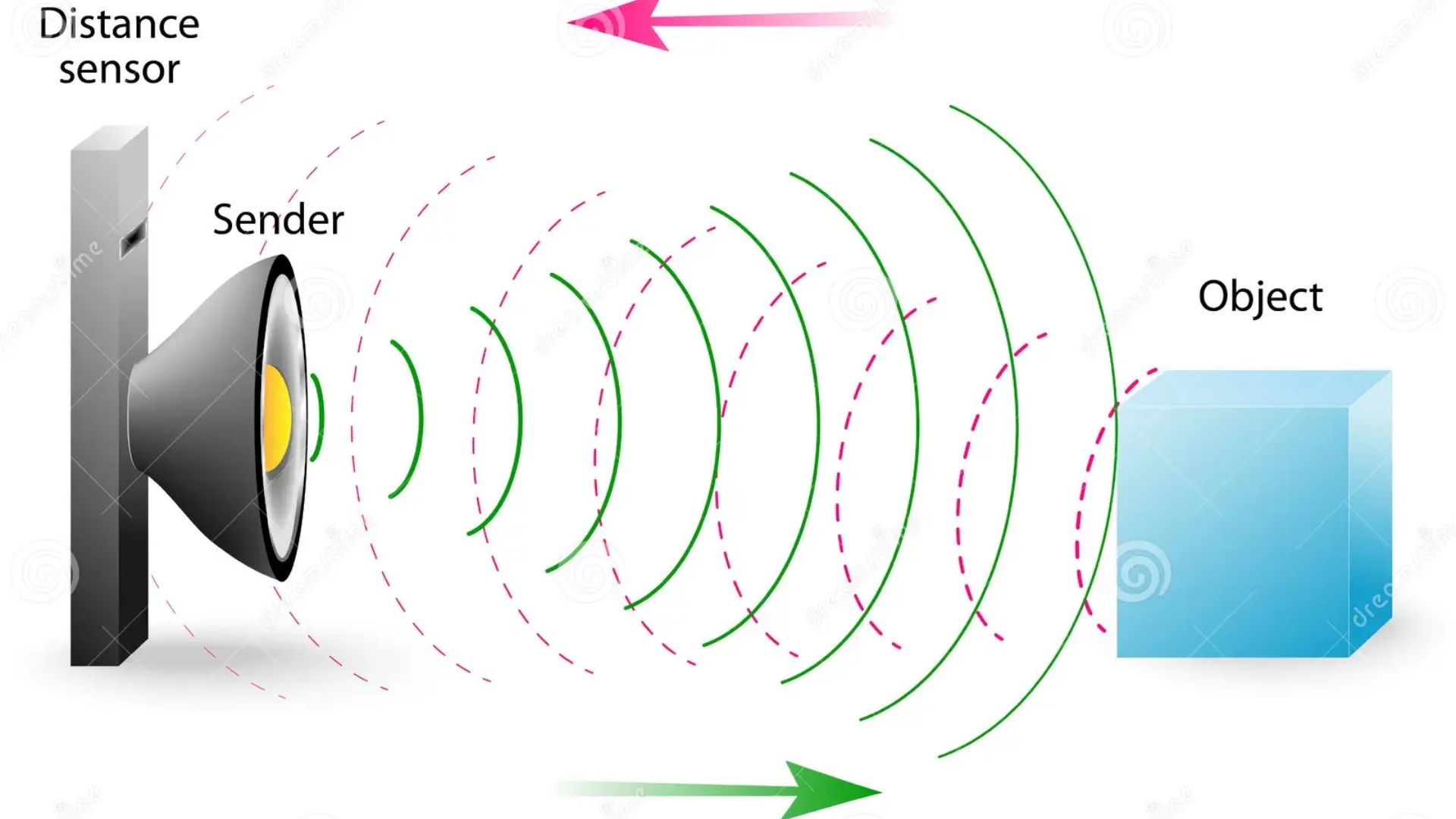
• According to the inverse-square law, sound pressure increases exponentially as you get closer to the speaker, reducing by approximately 6 dB only when distance doubles. This proximity forces the microphone into the speaker’s amplified output zone, crossing the system’s operational threshold and causing an instant feedback loop.
No, UHF transmission strictly manages the radio frequency signal and does not prevent acoustic feedback. Microphone feedback is a physical sound wave issue, so any microphone will squeal if placed improperly in front of a speaker, regardless of its wireless technology.
In confined spaces, sound waves strike flat, non-porous surfaces like walls and glass, acting as acoustic mirrors. These surfaces bounce high-frequency signals back into the microphone with minimal energy loss, triggering rapid phase shifts and chaotic reverberations that cause feedback.
You should immediately reduce the microphone gain (input sensitivity) or the main master volume to break the feedback loop. This happens because the system’s Gain-Before-Feedback limit has been breached.
Yes, covering the microphone head disrupts the precisely calibrated rear acoustic ports used to cancel background noise. This handling error instantly transforms a directional cardioid microphone into an omnidirectional device, immediately triggering piercing feedback by picking up amplified room noise